Local Space: Unity 7 Is Already Shipping, In Pieces
Oct 08, 2026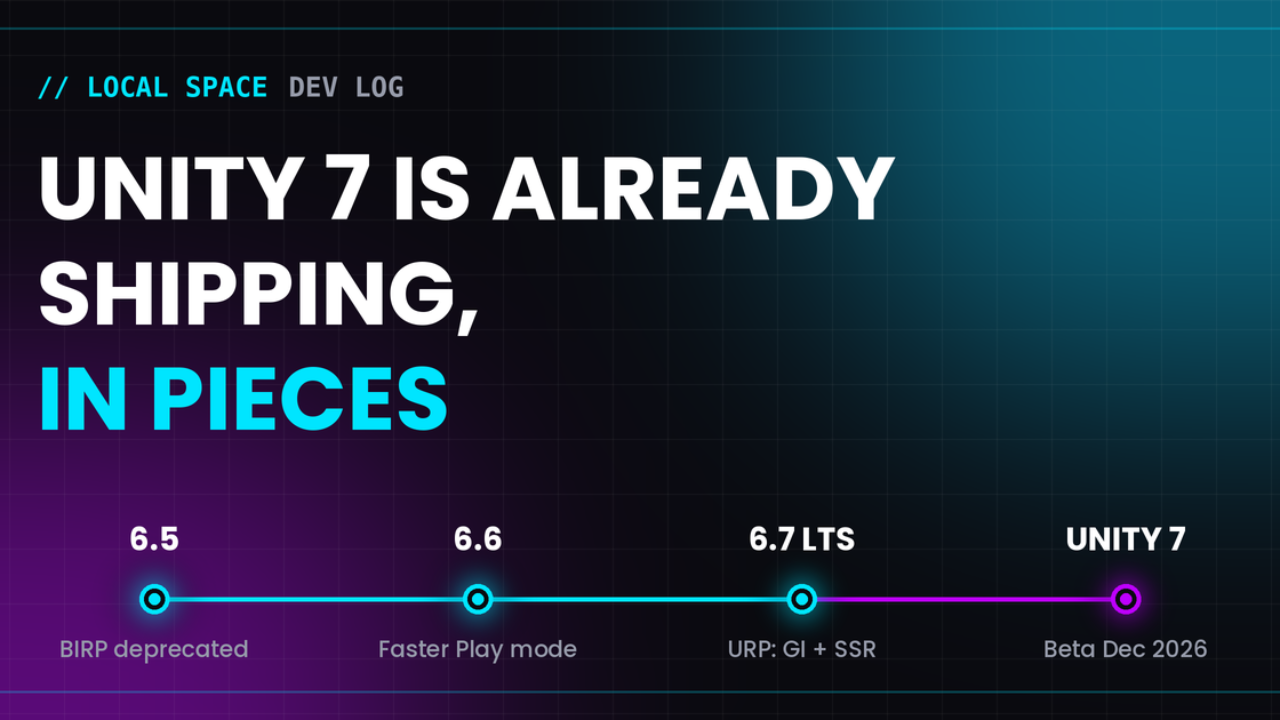
Welcome to Local Space.
If you are new here, this is my recurring dev log. I spend my week building in Unity, figuring out how to make things work, and inevitably breaking them. Then, I share the notes, tools, and code snippets that actually survived the process.
This week I've been reading everything Unity has said about Unity 7, and the most interesting part isn't a feature. It's the delivery plan: Unity 7 is arriving inside Unity 6, one point update at a time. In this log, we are looking at the roadmap, what CoreCLR changes in your daily loop, and the two new URP rendering features I'm most excited about: Surface Cache GI and Screen Space Reflections.
If you've got a project you're thinking about moving, jump on the Discord and tell me which version you're on. I'm curious how many of you are still on 2022 LTS.
1. The Roadmap Map (Roadmap Deep Dive)
Unity announced Unity 7 at Unite Seoul in July. The headline promise is that Unity 7 is a direct continuation of Unity 6, not a clean break, so existing projects are meant to carry forward with zero rebuilding. To make that believable, Unity says the foundational pieces, including CoreCLR and Surface Cache GI, are being shipped and production-verified in Unity 6.x releases first.
Here is how the pieces line up, as far as Unity has said publicly:
- Unity 6.5: The Built-in Render Pipeline is deprecated (it stays supported through 6.7 LTS). PSO caching improvements land for smoother shader loading.
- Unity 6.6: Faster Play mode is on by default for new projects, and the new Compute Light Baker arrives.
- Unity 6.7 LTS: An experimental CoreCLR desktop player, plus the URP rendering push: Surface Cache GI, Screen Space Reflections, and a GTAO preview.
- Unity 7: Early beta planned for December 2026, full release planned for early 2027. Mono is removed, and the CoreCLR editor brings .NET 10 and C# 14.
💡 Read the dates as a plan, not a promise
These are Unity's stated targets. Several of the rendering features are still previews, and previews move. Treat this as the direction of travel and re-check before you schedule anything around it.
2. What CoreCLR Changes in Your Daily Loop (Workflow Spotlight)
CoreCLR sounds like an engine-internals topic, but you will feel it in your iteration time. Today, Unity runs your C# on Mono, and every script change triggers a domain reload: the editor tears down and rebuilds its scripting state. Anyone who has watched that spinner after changing one line knows the cost.
- Now (6.6): Faster Play mode is on by default for new projects. This is Unity warming you up for what's coming.
- 6.7 LTS: An experimental CoreCLR desktop player. It runs on the existing .NET version and C# 9, so think of it as a compatibility testing step, not the finished product.
- Unity 7: Mono is gone, the editor runs on CoreCLR with .NET 10 and C# 14, and the traditional domain reload goes away.
One practical note for tool builders: if your editor scripts or build automation lean on domain reload behavior (polling for a reload to finish, for example), those assumptions are Unity-6-specific. It's worth a quick audit now rather than after the beta breaks something.
3. Surface Cache GI + SSR: Diffuse Meets Specular (Rendering Deep Dive)
This is the section I've been looking forward to. Real-time global illumination and screen space reflections are the two features that most change how a URP scene feels, and both are arriving together. The nice part is that they're designed to cover different halves of the lighting problem.
Surface Cache GI (SCGI) is a new URP system for real-time indirect diffuse lighting. Instead of baked lightmaps or probes, it divides the space of surface positions and directions into patches, then shoots rays to work out the average incoming light for each patch. Unity describes it as heavily inspired by Frostbite's GIBS, the Kajiya renderer's irradiance cache, and NVIDIA's SHARC. It does not require hardware ray tracing, and the goal is a single renderer that scales from high-end PC down to mobile, with no long bake times.
Screen Space Reflections (SSR) handle the specular side. SSR marches rays through the screen using the camera's color and depth buffers, and it also needs no hardware ray tracing. The tradeoff is built into the name: it can only reflect what is visible on screen. SSR is applied additively on top of existing baked lighting, so it plays nicely with what you already have.
🎮 The mental model
SCGI answers "how does light bounce around and color the shadows?" SSR answers "what do shiny surfaces show?" Unity's own FAQ says to combine SCGI with reflection probes and SSR, because SCGI is diffuse-only. Probes are your fallback for anything SSR can't see.
[ADD: one or two screenshots from your own test scenes here, ideally a before/after with SCGI off and on.]
Honest caveats: a rendering system's first release is rarely its best one, so test on your own content before betting a project on it. SSR is screen-limited by nature, so water, floors, and wet surfaces are its sweet spot. One forum thread also reports that transparent reflections can't be used with MSAA enabled, which is exactly the kind of thing to check early if you rely on MSAA.
4. Try It This Week (Hidden Gem)
You don't have to wait for the beta to form an opinion. If you can spare a scratch project, these are worth an hour:
- Surface Cache GI: Unity's preview thread links a getting-started guide and a feedback survey. Read the limitations section first, it will save you time.
- Screen Space Reflections: The URP preview thread has a setup guide and the Oasis template scene, which uses SSR on water.
- Compute Light Baker: Available from the 6.6 alphas. If you still bake lighting, it's worth comparing bake times.
Surface Cache GI preview thread and URP Screen Space Reflections preview thread. Unity is actively asking for feedback on both, so your bug reports genuinely help.
5. Staying Ready (Business of Indie Dev)
The strategy that falls out of all this is refreshingly boring. If the Unity 7 pieces ship in Unity 6.x first, then staying current on Unity 6 is the migration plan. For a live project, 6.7 LTS is the release to plan around. If you're still on 2021 or 2022 LTS, this is the moment to start the jump to Unity 6.
The one thing to check right now is your render pipeline. SCGI and SSR are URP features, and the Built-in pipeline is deprecated. Drop this on any GameObject in a scene to see where you stand:
using UnityEngine;
using UnityEngine.Rendering;

public class PipelineCheck : MonoBehaviour
{
void Start()
{
var rp = GraphicsSettings.currentRenderPipeline;
Debug.Log(rp == null
? $"Built-in Render Pipeline on Unity {Application.unityVersion}"
: $"{rp.GetType().Name} on Unity {Application.unityVersion}");
}
}
The Readiness Checklist (Save This):
- Version: Are you on a current Unity 6 release, or do you have a plan to get there?
- Pipeline: Are you on URP? If you're on Built-in, that's your real migration project.
- Editor scripts: Do any of them depend on domain reload timing?
- Project health: Missing scripts, broken references, and inconsistent settings are the things that turn a smooth upgrade into a long weekend. Scan before you jump, not after.
That last item is the one I built ORDO for, but the checklist works with or without it. Back up your project before any major version jump.
// When you are ready
Here are 3 ways I can help you level up your game dev journey:
Local Space is a production of Faktory Studios.
© 2026 All rights reserved.
Join the Local Space Newsletter
Weekly Unity dev tips, tools, and short lessons to help you build faster and ship real projects.
We hate SPAM. We will never sell your information, for any reason.