What Unity's 2026 Roadmap Really Means for Your Project's Health
Sep 08, 2026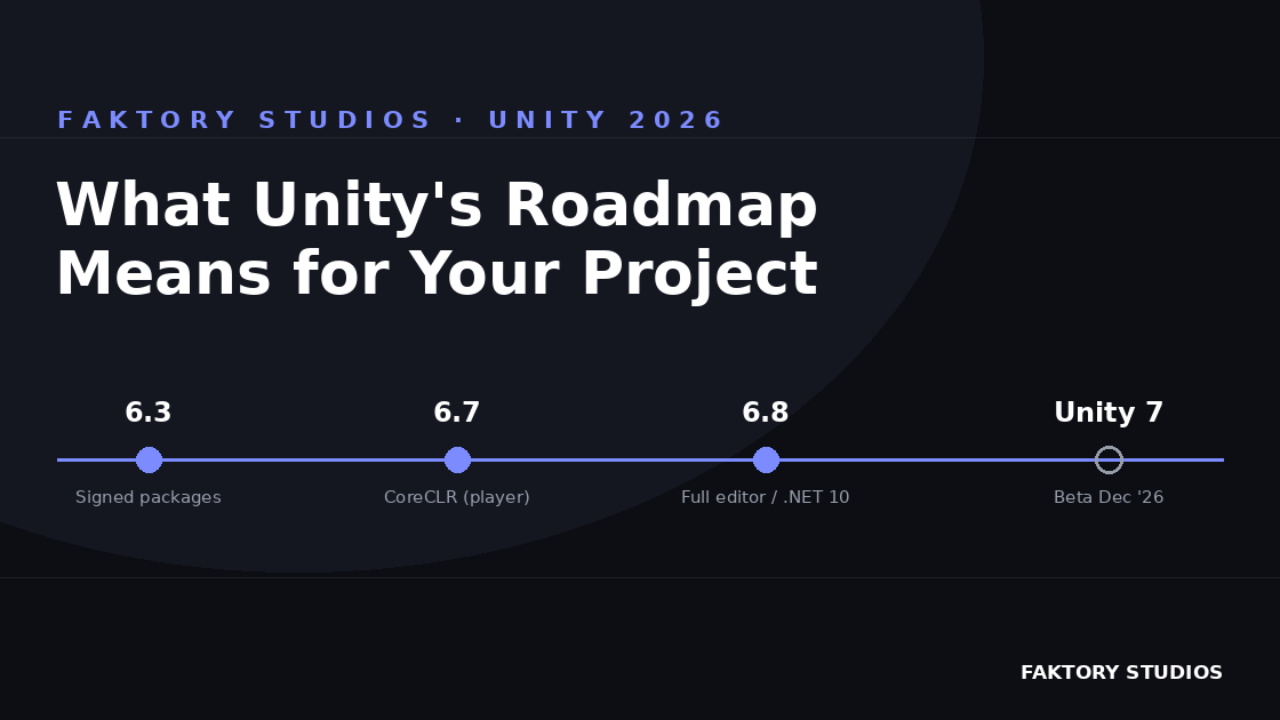
Unity has been shipping fast lately, and 2026 is shaping up to be one of the bigger inflection points the engine has had in years. Between the quarterly release cadence, a rewritten editor, and a slow migration to CoreCLR, there's a lot landing on our projects at once. This is a plain-language rundown (no assumed background) of what's actually coming, and the one thing none of it solves for you.
In this post
- Unity's new package "supply chain" (signed packages, verified authorship)
- The rewritten scene hierarchy and large-project performance work
- Production Verification and the new Developer Data Framework
- The CoreCLR / .NET 10 migration timeline
- The one gap none of it closes
A few terms before we start
Package Manager: the window in Unity where you install, update, or remove plugins and libraries (called "packages").
Prefab: a reusable, pre-built template for a game object (say, an enemy or a UI button) that you can stamp out repeatedly instead of rebuilding from scratch each time.
Scene hierarchy: the panel listing every object in your current level or screen, nested in a tree.
CoreCLR / .NET / C#: C# is the programming language Unity scripts are written in; .NET is the framework it runs on; CoreCLR is the actual engine that executes your compiled code under the hood. Think of it as the part of Unity that turns your scripts into something the computer can run.
Unity is finally treating packages like a supply chain
Starting with Unity 6.3, the editor adds built-in support for signed packages (basically a digital signature proving a package really came from who it claims to, the same idea as a verified checkmark) and visible trust indicators right in the Package Manager. Unsigned packages will trigger warnings, and verified authorship gets handled by Unity, an org admin, or an approved publisher. Unity is calling this framework "Core Standards": supply-chain hygiene for the asset ecosystem you've been quietly trusting for years.
If you've ever installed a plugin, forgotten to double-check it, and had it silently break something three months later, this is a welcome change. But it only covers packages coming into your project from outside. It says nothing about the mess that accumulates inside your own project over time: the broken prefab links, the orphaned ScriptableObjects (Unity's term for a reusable data container you build yourself, like a shared settings file), the scene references nobody remembers adding.
The editor itself is getting a serious rebuild
Unity 6.3 also brings a rewritten scene hierarchy (the object list panel mentioned above) built on UI Toolkit (Unity's newer, faster system for building its own editor windows and panels), plus a rebuilt grid and snapping system, a customizable main toolbar, and a switch to a lightweight database format called LMDB for internal search, aimed squarely at large-project performance. If you've felt your hierarchy chug once a project crosses a few thousand objects, this is Unity acknowledging that pain directly.
It's a genuinely good update. It also means anyone with years of accumulated scene debt is about to see that debt rendered faster and more visibly than ever. A cleaner, quicker hierarchy doesn't fix inconsistent naming conventions or duplicate prefab variants; it just lets you scroll past them more smoothly.
Testing culture is shifting earlier in the pipeline
Unity's Production Verification program now links internal and external studios to test new features against real, in-production projects before they ship broadly, instead of Unity finding out something's broken only after millions of players hit it. Unity reports meaningfully faster fixes for regressions (a "regression" is just a bug that reintroduces a problem that used to be fixed) and a smaller backlog of open bugs since expanding the program to partner studios. On top of that, diagnostics and analytics are being merged into a new Developer Data Framework: a unified system for collecting the technical signals (crash reports, performance data) that help Unity catch issues earlier, with player-data consent kept conservative by default.
The direction is clear: Unity wants problems caught before they compound, not after. That's exactly the instinct worth applying to your own project, not just the engine shipping it to you.
CoreCLR is coming, and it's not a small migration
Quick refresher: your Unity scripts are written in C#, which needs to be translated into instructions a computer can actually run; that translation is CoreCLR's job. The CoreCLR transition continues on schedule: desktop player support (the translation layer used when your built game runs on Windows/Mac/Linux) lands in version 6.7, and full editor integration (the same upgrade inside the Unity editor itself, while you're working) lands in 6.8, bringing newer language versions, .NET 10 and C# 14, along with it. Unity's messaging has been "zero rebuild," meaning most projects shouldn't need major rework to keep working. For most projects that'll hold true. But any engine-level runtime migration is a good forcing function to ask: how confident are you that your project's references, dependencies, and team conventions are actually consistent right now? Migrations don't create technical debt; they just surface it all at once.
The common thread
Every one of these changes points the same direction: Unity is investing heavily in catching problems earlier, whether that's a compromised package, a slow hierarchy, or a regression that used to ship quietly. It's a great sign for the engine's maturity.
But none of it looks inside your specific project. Unity can verify a package's author. It can't tell you that three prefabs in your scene are pointing at a deleted reference, or that your naming conventions drifted halfway through a sprint, or that the "readiness" checks your team relies on live entirely in one person's head.
That's the gap we built ORDO to close: validating scenes, prefabs, and references, and keeping team policies consistent, so the parts of your project Unity can't see stay just as clean as the parts it can. If you're already thinking about how your project will hold up through the 6.3 and CoreCLR waves, it's worth a look.
As always: upgrade thoughtfully, back up your project before any major version jump, and don't let "zero rebuild" promises stop you from doing your own readiness pass first.
Join the Local Space Newsletter
Weekly Unity dev tips, tools, and short lessons to help you build faster and ship real projects.
We hate SPAM. We will never sell your information, for any reason.